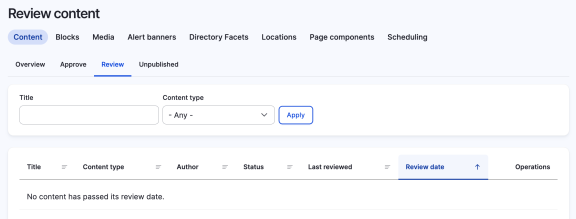
How to add a review date to a piece of content
This needs a submodule called 'LocalGov Review Date'. It's included in LocalGov Drupal, but is not switched on - talk to your developer about enabling it.
Content should be reviewed regularly to ensure that it is relevant and up to date. We can track these reviews using the 'Review date' feature.
An example workflow for Review date
- On publishing a piece of content we set a default review date of 1 year
- A year passes and the review due date passes
- A revision of the content appears in the "Needs Review" dashboard
- An editor does a thorough review and publishes the reviewed content, with a new review date of 1 year.
Set the Review date
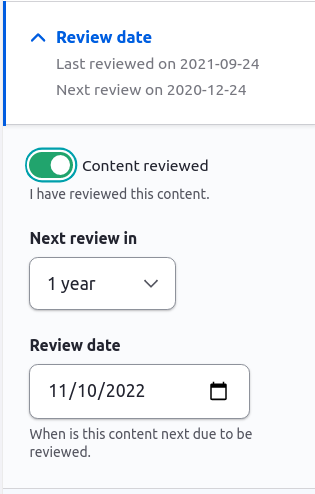
When you create or edit a piece of content you will see the Review date panel in the sidebar.
When you make an edit you can choose whether to classify it as a "Content review" or not. By default this is set to false.
If you toggle this button to true you can set the date that the next review is due.
When the next review is due, a revision of the content will appear under the 'Review' tab. The (unreviewed) content will remain published unless you decide to remove it.