
Service status content type
Service status allow you to give updates about the status of the relevant service. You can position these around your site so users will see them as they engaged with a particular service.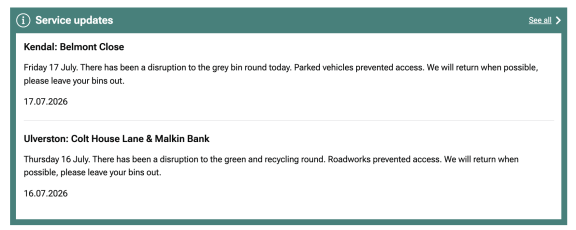
Image caption: A screenshot from Westmorland and Furness Council using the service status updates at the bottom of a service landing page for Bins, recycling and street cleaning.
A list of service statuses also appears on the URL service-path and update:
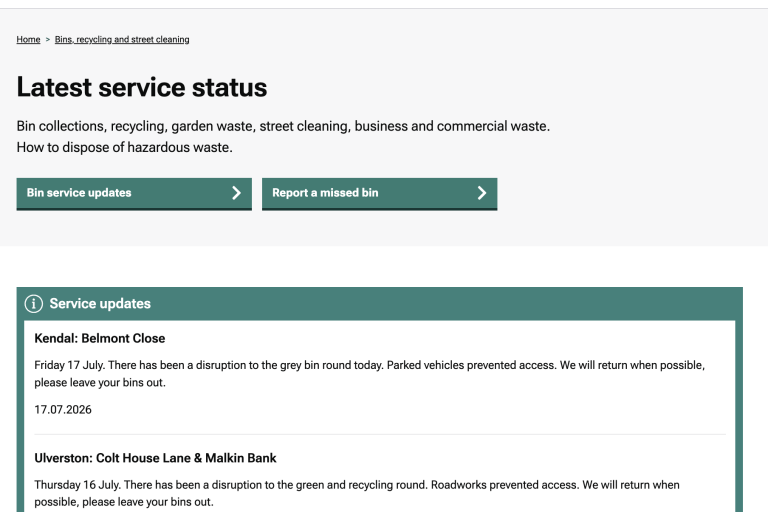
Image caption: A screenshot from Westmorland and Furness Council showing the full service status page with updates on bin collections.
When to use a service status
Publish a service status when you want to tell your citizens about a significant impact to the service.
You can choose one of 3 categories to assign to a service status:
- Limited service (if a service is dramatically reduced or stopped)
- Revised service (if a service pattern has changed)
- Normal service
Where service status messages can be displayed
You have lots of choices about where service status messages can be displayed:
- on the service landing page where this service lives
- on your organisation's overall service status list (at /service-status)
- on specific pages around your site, below the title and above the body copy for the page
This means users will see this content before they start reading your page.
To set the position of a service status update, edit it and you'll see the following controls.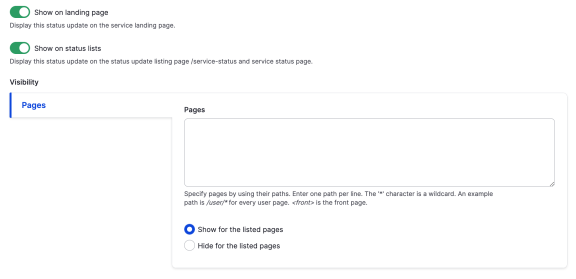
Image caption: Screenshot of the backend of a LDG showing the editor screen where you can determine where the service status page will appear.
In the pages field, enter paths rather than entire urls. For example:
- /rubbish-recycling-and-streets/bins-and-collections/check-your-bin-and-box-collection-days puts the status message on that page alone
- /rubbish-recycling-and-streets/* puts the status message on the entire section
You can define a set of pages and either include or exclude them.